# Best Mockup Generators for Etsy Sellers in 2026
Product photos make or break Etsy listings. For print-on-demand sellers, digital product creators, and art print shops, mockups are the product photos. A poster design flat on a white background gets scrolled past. The same poster in a styled living room scene gets clicked.
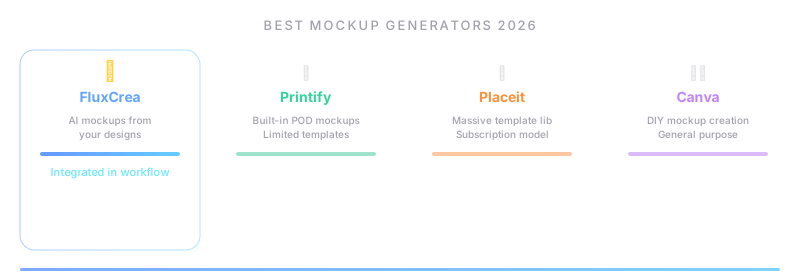
According to seller communities, many sellers report that lifestyle mockups can improve click-through rates by 30-50% compared to flat product images. On Etsy, where you're competing with millions of other listings in search results, that difference directly translates to sales.
But creating professional mockups is time-consuming. If you're adding 10 new designs per week across multiple product types, you might need 50-100 mockups weekly. Doing that in Photoshop isn't sustainable.
Here's our ranking of the best mockup generators for Etsy sellers in 2026.
How We Evaluated
We focused on what Etsy sellers specifically need from mockup tools:
- Template variety — How many templates are available? Do they cover your product types (posters, t-shirts, mugs, tote bags, phone cases, wall art)?
- Output quality — Resolution, realism, and styling. Would a buyer believe these are real product photos?
- Batch processing — Can you generate multiple mockups at once, or is it one-at-a-time?
- Pricing model — Per-mockup, subscription, or unlimited?
- Commercial license — Can you legally use these mockups in Etsy listings?
- Ease of use — How fast can you go from design file to finished mockup?
1. Placeit by Envato — Largest Template Library
Placeit is the biggest name in mockups, with over 19,000 mockup templates (29,000+ total design assets) spanning every product category imaginable. If you need a specific mockup — say, a poster in a Scandinavian-style bedroom, or a t-shirt on a model at a coffee shop — Placeit probably has it.
Key features:
- 19,000+ mockup templates — The largest library available
- Product coverage — T-shirts, posters, mugs, phone cases, tote bags, hoodies, stickers, book covers, device screens, and more
- Video mockups — Animated mockups for social media (unique feature)
- Smart templates — Upload your design, adjust positioning, download
- Logo maker and design tools — Basic design capabilities built in
- No software needed — Entirely browser-based
Pricing:
| Plan | Price | Key details |
|---|---|---|
| Single mockup | $7.95 | Pay per download |
| Unlimited | $14.95/mo | Unlimited downloads, all templates |
| Envato Elements | $16.50/mo | Placeit + millions of other creative assets |
Best for: Sellers who need variety. If you sell across many product categories and want a different mockup style for each, Placeit's library is unmatched. The Envato Elements bundle is excellent value if you also need fonts, graphics, and stock photos.
Limitations: No batch processing — you upload one design at a time. For sellers who need 50 mockups per week, this gets tedious. Templates vary in quality; the best ones are great, but the library includes older, less polished options.
Our take: Placeit is the safe default. The library is huge, the quality is generally good, and the unlimited plan is fairly priced. Its main weakness is speed — there's no way to automate or batch-process mockup creation.
2. Kittl — Best for AI-Enhanced Design & Mockups
Kittl has grown rapidly by combining traditional mockup templates with AI-powered design tools. It's not just a mockup generator — it's a design platform that happens to do mockups really well.
Key features:
- AI design tools — Generate backgrounds, remove backgrounds, upscale images, and create variations using AI
- Mockup templates — Curated library focused on quality over quantity
- Design editor — Full design capabilities (think Canva but more focused on print/mockup work)
- Commercial license — All plans include commercial use rights (important for Etsy)
- Font library — Extensive curated font collection
- Export options — High-resolution PNG, PDF, and SVG export
Pricing:
| Plan | Price | Key details |
|---|---|---|
| Free | $0 | Limited exports, watermarked |
| Pro | $15/mo ($10/mo annual) | Full exports, commercial license |
| Expert | $30/mo ($24/mo annual) | Priority AI, unlimited projects |
Best for: Sellers who want to create both designs AND mockups in one tool. If you're designing posters, t-shirt graphics, or stickers and then need to mockup those designs, Kittl handles the entire workflow. The AI tools are genuinely useful for background generation and image enhancement.
Limitations: Smaller mockup library than Placeit. Less focused on mockups specifically — it's a design tool first. No batch processing for mockups.
Our take: Kittl is the most innovative tool in this space. If you're a design-first seller (you create your own artwork), Kittl's combined design + mockup workflow is hard to beat. For sellers who just need to drop a finished design into a mockup, Placeit's larger library may be more practical.
3. Creative Fabrica — Best Value for Etsy Sellers
Creative Fabrica has become incredibly popular with Etsy sellers — not just for mockups, but for the entire creative asset ecosystem (fonts, graphics, patterns, mockups). At $3.99-9/month, it's the most affordable option with a POD-friendly license.
Key features:
- Massive asset library — Fonts, graphics, SVGs, patterns, and mockup templates
- POD-friendly license — Commercial use explicitly allowed for print-on-demand products
- Mockup templates — Growing library, especially strong for apparel and accessories
- Craft and design assets — Popular with the handmade/craft community
- AI art tools — Basic AI generation for backgrounds and patterns
- Regular freebies — Daily free downloads for subscribers
Pricing:
| Plan | Price | Key details |
|---|---|---|
| Free | $0 | Daily freebies only |
| All Access | $3.99/mo | Limited downloads |
| Plus | $9/mo | Unlimited downloads, commercial license |
Best for: Etsy sellers who need mockups AND design assets (fonts, graphics, patterns) for their products. The combined value is exceptional — $9/month for unlimited fonts, graphics, AND mockups is hard to beat. Particularly popular with sticker sellers, SVG designers, and craft-focused shops.
Limitations: Mockup library is smaller and less curated than Placeit's. Quality varies significantly. The platform is more focused on craft/design assets than professional product photography mockups. No batch processing.
Our take: If you already use Creative Fabrica for fonts and graphics (and many Etsy sellers do), the mockup templates are a nice bonus. As a standalone mockup tool, Placeit or Kittl offer better quality and selection.
4. Bulk Mockup — Best for High-Volume Batch Processing
Bulk Mockup takes a completely different approach: instead of a web app with templates, it's a Photoshop plugin that lets you generate hundreds of mockups from your own PSD templates in minutes.
Key features:
- Batch processing — Generate 100+ mockups in one operation (the defining feature)
- Photoshop integration — Works as a plugin inside Adobe Photoshop
- Use any PSD template — Not limited to a proprietary template library; use any smart object PSD
- Folder-based workflow — Point it at a folder of designs, select a PSD template, generate all mockups
- Resolution control — Output at whatever resolution you need
- Customizable — Full Photoshop control over every aspect of the mockup
Pricing: $15/month subscription.
Best for: High-volume POD sellers who add 20+ designs per week and need batch mockup generation. If you already use Photoshop and have PSD mockup templates (purchased or custom), Bulk Mockup turns a 2-hour manual process into a 5-minute automated one.
Limitations: Requires Photoshop (current Photoshop subscription required). Requires PSD templates (you need to source or create them). No web interface — desktop only. Learning curve for sellers not familiar with Photoshop Smart Objects.
Our take: Bulk Mockup solves the scaling problem that browser-based tools can't. If you're generating 50+ mockups per week, the time savings pay for itself immediately. But it's only practical if you already use Photoshop.
5. Dynamic Mockups — Best for Automation & API
Dynamic Mockups is built for sellers who want to completely automate their mockup workflow. Its API and Etsy integration allow you to generate mockups programmatically — no manual uploading required.
Key features:
- API access — Generate mockups programmatically (REST API)
- Etsy integration — Connect directly to Etsy and generate mockups for listings
- Batch processing — Generate multiple mockups via API calls
- Template editor — Create custom mockup templates in the browser
- Color and sizing options — Adjust background colors, design positioning, and sizing via parameters
- PSD import — Convert existing PSD templates into Dynamic Mockups templates
Pricing: Variable — based on API usage and number of templates. Contact for pricing.
Best for: Tech-savvy sellers or teams with developers who want to automate mockup generation end-to-end. If you're building a workflow where new designs automatically generate mockups and upload to Etsy, Dynamic Mockups provides the infrastructure.
Limitations: Requires technical knowledge to set up API integrations. Not practical for sellers who just want to upload a design and click "generate." Pricing isn't transparent. Smaller template library than Placeit.
Our take: Dynamic Mockups is the power user's choice. If you're running a POD operation at scale and want zero-touch mockup generation, the API approach is the right one. For everyone else, a simpler tool is probably a better fit.
6. Printful Mockup Generator — Best Free Option
Printful includes a mockup generator for free — but only for products in Printful's catalog. If you already use Printful for fulfillment, this is a no-cost way to generate product mockups.
Key features:
- Free — Included with every Printful account (no paid tier required)
- Product-accurate mockups — Templates match Printful's actual products exactly
- Multiple angles — Front, back, detail views for each product
- Model mockups — Apparel shown on diverse models in lifestyle settings
- Branding options — Add custom neck labels, inside labels, and pack inserts to mockups
- Direct publishing — Generate mockups and push to Etsy listings in one workflow
Pricing: Free (included with Printful account). Printful makes money on fulfillment, not mockups.
Best for: Sellers who already use Printful for print-on-demand fulfillment. The mockups are product-accurate (they look exactly like what the customer will receive), which builds trust. And you can't beat free.
Limitations: Only works for Printful products. Can't use it for custom products, art prints from your own printer, or non-Printful merchandise. Template variety is limited to Printful's product catalog. Not useful for sellers who don't use Printful.
Our take: If you sell through Printful, use their mockup generator — it's free and the mockups are accurate to the actual product. Just don't rely on it as your only mockup source; you'll want lifestyle/scene mockups from other tools to complement the product shots.
7. Mockupify — Best for Automation Features
Mockupify positions itself as the mockup tool for sellers who want automation without the complexity of an API. It bridges the gap between simple upload-and-generate tools and full developer-oriented solutions.
Key features:
- Automated mockup generation — Set up templates once, generate mockups for new designs automatically
- Template library — Curated collection of product mockup templates
- Batch processing — Generate multiple mockups per design in one operation
- Marketplace integration — Direct publishing to Etsy and other platforms
- Customization — Adjust colors, backgrounds, and positioning per template
- Team features — Collaboration tools for shops with multiple team members
Pricing: $15/month (Starter) → $29/month (Pro). Free trial available.
Best for: Mid-volume sellers (10-50 new designs per week) who want batch processing and automation without learning Photoshop or APIs. Mockupify's sweet spot is sellers who've outgrown one-at-a-time tools like Placeit but don't need the full power of Bulk Mockup or Dynamic Mockups.
Limitations: Smaller template library than Placeit. Newer product — less battle-tested. Pricing adds up for very high-volume sellers who might be better served by Bulk Mockup's flat annual rate.
Our take: Mockupify fills a real gap in the market between "upload one design and wait" and "set up Photoshop scripts." If you're generating 10-30 mockups per week and want a web-based tool that handles batching, it's worth a trial.
8. FluxCrea — One to Watch (Coming Soon)
FluxCrea is building mockup generation directly into the listing management workflow. Instead of creating mockups in one tool and uploading them in another, the mockups are generated as part of the listing creation process.
What's planned:
- Integrated mockup generator — Create mockups inside the same tool where you edit listings
- Batch generation — Generate mockups for multiple listings simultaneously
- Custom templates — Use your own mockup templates alongside built-in ones
- Automatic attachment — Mockups are automatically added to the correct listing photos
- AI optimization — AI suggests which mockup styles perform best for your product category
- Multi-platform — Same mockups formatted for Etsy, Shopify, and eBay requirements
Pricing: Not yet announced.
Best for: Sellers who are tired of the disconnect between mockup creation and listing management. Today, you generate mockups in Placeit, download them, upload them to Etsy, and assign them to listings. FluxCrea's vision is to collapse that into one step.
Comparison Table
| Tool | Templates | Batch | AI Features | Free Tier | Price | Photoshop Needed |
|---|---|---|---|---|---|---|
| Placeit | 19,000+ | ✗ | ✗ | ✗ | $14.95/mo | ✗ |
| Kittl | Growing | ✗ | ★★★★☆ | ★★☆☆☆ | $15-30/mo | ✗ |
| Creative Fabrica | Medium | ✗ | ★★☆☆☆ | ★★☆☆☆ | $3.99-9/mo | ✗ |
| Bulk Mockup | Any PSD | ★★★★★ | ✗ | ✗ | $15/mo | Yes |
| Dynamic Mockups | Custom | ★★★★☆ | ✗ | Varies | Variable | ✗ |
| Printful | Product-only | ★★☆☆☆ | ✗ | ★★★★★ | Free | ✗ |
| Mockupify | Medium | ★★★★☆ | ✗ | Trial | $15-29/mo | ✗ |
| FluxCrea | Planned | Planned | Planned | TBA | TBA | ✗ |
How to Choose the Right Mockup Generator
"I need variety — lots of different product types and styles"
→ Placeit has the largest library by far. If you sell across many product categories, start here.
"I design my own products and want design + mockup in one tool"
→ Kittl combines design tools with mockup generation. Great for sellers who create original artwork.
"I'm on a tight budget and need fonts/graphics too"
→ Creative Fabrica at $9/month for unlimited fonts, graphics, AND mockups is exceptional value.
"I add 20+ new designs per week and need batch processing"
→ Bulk Mockup ($15/mo) if you use Photoshop. Mockupify ($15-29/month) if you don't.
"I want to fully automate mockup generation via API"
→ Dynamic Mockups is built for programmatic mockup generation.
"I use Printful and just need basic product mockups"
→ Printful's free mockup generator is accurate and costs nothing. Use it alongside a lifestyle mockup tool.
"I want mockups integrated with listing management"
→ That's what FluxCrea is building. No launched product currently combines mockup generation with listing editing and SEO optimization. Join the waitlist.
Tips for Better Etsy Mockups
Here's a great video with practical tips for creating better Etsy mockups:
Regardless of which tool you choose, these tips will improve your mockup quality:
- Use lifestyle mockups for your primary photo. Flat-lay and white background shots work as secondary images, but lifestyle scenes drive more clicks from search results.
- Show scale. Include objects that communicate size — a hand holding a mug, a person wearing a t-shirt, a poster on a wall with furniture for reference.
- Maintain visual consistency. Use the same mockup style across your shop so listings look cohesive. Buyers who land on your shop page should see a unified brand.
- Use all 10 photo slots. Etsy gives you 10 images per listing. Use them. Show different angles, detail shots, size comparisons, and lifestyle scenes.
- Optimize file size. Etsy recommends 2000px on the shortest side at 72 DPI. Larger files load slower and don't look better.
- A/B test your primary photo. Your first image is your thumbnail in search results. Even small improvements in click-through rate compound across thousands of impressions.
The Bottom Line
The mockup tool landscape in 2026 breaks down into three tiers:
For most sellers: Placeit ($14.95/month) or Creative Fabrica ($9/month) provides enough templates and quality for a professional-looking shop.
For high-volume sellers: Bulk Mockup ($15/mo) or Mockupify ($15-29/month) adds batch processing that saves hours per week.
For automation-focused sellers: Dynamic Mockups (API) or FluxCrea (coming soon) integrates mockup generation into a larger workflow.
The biggest unmet need in this space is integration. Today, mockup generation is a standalone step — disconnected from your listing editor, your SEO tools, and your product catalog. Tools that close this gap will save sellers the most time.
Related Articles
- The Complete Etsy Mockup Guide for POD Sellers
- FluxCrea vs Printify — Which Is Better for POD?
- FluxCrea vs CreativeHub — Full Comparison
Want mockups integrated with your listing workflow? Join the FluxCrea waitlist at fluxcrea.com/coming-soon.