
# How to Bulk Edit Etsy Listings in 2026 (Save Hours Every Week)
If you manage more than 50 listings on Etsy, you already know the pain. Updating prices one by one, rewriting titles listing by listing, fixing tags across your entire shop — it adds up fast. What should take 10 minutes becomes an entire afternoon.
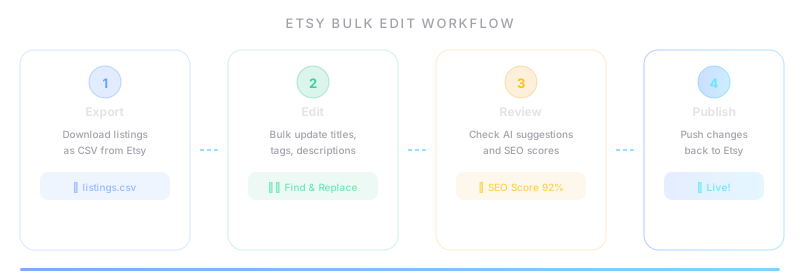
The good news: you do not have to do it manually. Whether you use Etsy's built-in tools, CSV exports, or third-party software, there are proven ways to bulk edit your Etsy listings and reclaim hours of your week.
This guide covers everything you need to know — the methods, the tools, the pitfalls, and the exact steps to follow. No fluff, no theory. Just actionable advice you can apply today.
Why Bulk Editing Matters More Than Ever
Time savings that compound
Let's do some quick math. If you spend 3 minutes editing a single listing (title, tags, price), and you have 200 listings to update, that is 10 hours of work. With bulk editing, you can accomplish the same changes in under an hour.
For seasonal sellers, this is critical. Holiday pricing changes, back-to-school updates, summer collection launches — these all require rapid, shop-wide modifications. Manual editing is not just slow; it is a competitive disadvantage.
Consistency across your shop
When you edit listings one at a time, inconsistencies creep in. One listing says "Free shipping," another says "Ships free." Some titles use your new keyword strategy, others still have last year's phrasing. Bulk editing lets you enforce consistency across every listing in a single pass.
SEO impact
Etsy's search algorithm rewards shops that regularly update their listings. Bulk editing lets you refresh titles, tags, and descriptions across your shop in one session — sending a strong signal to Etsy's algorithm that your shop is active and well-maintained.
What You Can Bulk Edit on Etsy
Before diving into methods, let's clarify what Etsy actually allows you to change in bulk:
- Titles — Update keywords, add seasonal terms, fix formatting
- Tags — Replace underperforming tags, add trending keywords, remove duplicates
- Descriptions — Update policies, add cross-sell links, refresh copy
- Prices — Seasonal sales, cost adjustments, rounding to .99
- Shipping profiles — Switch between profiles, update processing times
- Photos — Replace watermarked images, update lifestyle shots, reorder
- Inventory and variations — Update stock quantities, variation prices
- Materials and attributes — Update materials lists, occasion tags, style tags
- Sections — Reorganize listings into different shop sections
- Renewal options — Toggle auto-renew on or off
Not everything can be edited through every method. Etsy's native CSV, for example, has limitations around photos and variations. Third-party tools vary in what they support. We will cover these differences below.
Method 1: Etsy's Native Bulk Editing Tools
Etsy provides two built-in ways to edit multiple listings at once.
The Listing Manager
In your Etsy Shop Manager, go to Listings and select multiple listings using the checkboxes. A toolbar appears at the top with options to:
- Change price (set a specific price or apply a percentage change)
- Update shipping profile
- Change section
- Renew listings
- Deactivate or delete listings
- Add or remove tags
Strengths: Free, no setup required, works directly in your browser.
Limitations: You can only edit a handful of fields. No title editing, no description editing, no photo management. For shops with 100+ listings, pagination makes this tedious.
Etsy CSV Download and Upload
Etsy allows you to download your entire shop as a CSV file and re-upload it after making changes. This is the most powerful free method available.
How to do it:
- Go to Shop Manager > Settings > Options > Download Data
- Select Download CSV to get your current listings
- Open the file in Google Sheets or Excel (avoid Numbers on Mac — it mangles formatting)
- Make your changes in the spreadsheet
- Go back to Shop Manager > Listings > Import and export > Upload CSV
- Review the preview and confirm
What you can edit via CSV:
- Titles, descriptions, tags (all 13)
- Prices, quantities, SKUs
- Materials, shipping profiles
- Sections, renewal settings
- Variation names and prices
What you cannot edit via CSV:
- Photos (no image URLs in Etsy's CSV format)
- Listing videos
- Digital file attachments
- Production partners
Pro tips for CSV editing:
- Always keep a backup of the original CSV before making any changes
- Use Find & Replace in your spreadsheet for shop-wide text changes
- Be careful with leading zeros in SKUs — format those columns as text
- Tags are separated by commas within a single cell — do not split them across columns
- Upload a small batch (10-20 listings) first to verify your changes before doing the full shop
Method 2: Third-Party Bulk Editing Tools
For sellers who need more power, speed, or specific features, third-party tools fill the gaps.
Setting up for success with any tool
Regardless of which tool you choose, follow these preparation steps:
Step 1: Back up your shop. Download a full CSV export from Etsy before connecting any third-party tool. Store it somewhere safe. If anything goes wrong, you can re-upload this file to restore your shop to its previous state.
Step 2: Identify what needs changing. Before opening any tool, make a list of the specific changes you want. For example:
- "Add 'gift for mom' to all titles in my jewelry section"
- "Increase all prices by 15% and round to .99"
- "Replace tag 'handmade gift' with 'personalized gift 2026' across all listings"
Having a clear plan prevents the "while I'm at it" trap that leads to accidental changes.
Step 3: Start with a test batch. Never edit your entire shop on the first try. Pick 5-10 listings, apply your changes, verify them on Etsy, and only then proceed with the full shop.
Step 4: Verify before publishing. Every tool shows you a preview or diff of what will change. Read it carefully. One misplaced comma in a CSV can overwrite 500 descriptions with garbage.
Step 5: Check your shop after syncing. Open 3-5 random listings on Etsy after your bulk edit is complete. Verify that titles, descriptions, tags, prices, and images all look correct. Do not assume everything worked — verify.
Common Mistakes to Avoid
Even experienced sellers make these errors. Here is what to watch out for.
1. Editing without a backup
This is the most common and most devastating mistake. If your bulk edit goes wrong — a formatting error wipes descriptions, a formula miscalculates prices, a tool syncs incomplete data — you need a way to roll back.
Rule: Always download a fresh CSV from Etsy before any bulk operation. Always.
2. Changing too many listings at once
Etsy's systems can be slow to process large uploads. If you push changes to 1,000 listings simultaneously, you may encounter timeouts, partial updates, or sync errors. Break large edits into batches of 200-500 listings.
3. Ignoring variations
Listings with variations (size, color, material) are more complex than simple listings. When you bulk-edit a price, does the change apply to the base listing or to each variation? Different tools handle this differently. If you have variation-heavy listings, test carefully.
4. Forgetting about SEO impact
Changing titles and tags affects your search ranking. If you bulk-replace a keyword that was driving traffic, your views could drop. Before making major keyword changes, check your Etsy Stats to identify which search terms are currently bringing visitors. Do not replace what is already working.
5. Not checking for formatting issues
CSV files are fragile. Special characters (quotes, commas, ampersands) can break fields. Excel sometimes auto-formats numbers, dates, or ZIP codes. Always spot-check your CSV before uploading, and format SKU/ZIP columns as plain text.
6. Overwriting blank fields
Some tools and CSV uploads treat empty cells as "delete this field." If you leave a description cell blank in your CSV, Etsy may interpret that as "remove the description." Understand how your tool handles empty fields before syncing.
Tools That Can Help
Here is an honest breakdown of the bulk editing tools available in 2026.
Vela — The Current Leader
Price: Starting at $10/month
Vela is a popular bulk editing tool for Etsy sellers. It supports bulk editing of titles, descriptions, tags, prices, photos, and more. You can filter listings, make changes to selected groups, and sync back to Etsy.
What it does well:
- Intuitive interface for selecting and editing groups of listings
- AI-assisted title and description editing
- Photo management (reorder, replace, bulk upload)
- Multi-channel support (Etsy, Shopify, eBay, Faire)
- Profile templates for consistent listing creation
Limitations:
- No built-in keyword research or SEO scoring
- No mockup generation
- Learning curve for advanced features
Best for: Sellers with 100+ listings who need a reliable, full-featured bulk editor.
Evlista — The Repricing Specialist
Price: Free tier available, paid plans from $15/month | Chrome users: Growing
Evlista focuses on bulk photo editing and repricing. Its standout feature is "magic revert" — the ability to undo bulk changes if something goes wrong.
What it does well:
- Fast bulk price adjustments (percentage or fixed amount)
- Photo editing tools (brightness, contrast, bulk watermark)
- Magic revert for undoing changes
- Simple, focused interface
Limitations:
- Fewer features than Vela for description/tag editing
- Smaller community and less documentation
- Limited multi-platform support
Best for: Sellers who primarily need price management and photo editing in bulk.
Etsy CSV (Native) — Free But Limited
Price: Free
As covered above, Etsy's own CSV import/export is completely free and gives you direct control over your data. For sellers comfortable with spreadsheets, this is a viable zero-cost option.
What it does well:
- No monthly fee
- Full control over your data
- Works with Google Sheets, Excel, or any spreadsheet tool
- No third-party access to your shop needed
Limitations:
- No photo management
- No undo/rollback (beyond your manual backup)
- No filtering or smart selection — you work with raw data
- Easy to make formatting mistakes
- No real-time preview of changes
Best for: Budget-conscious sellers comfortable with spreadsheets, or sellers who need occasional bulk edits rather than a daily tool.
FluxCrea — Coming Soon
Price: TBA (waitlist open)
FluxCrea is a new tool currently in development that aims to combine AI-powered listing optimization with bulk editing and mockup generation. It is not yet available, but its planned feature set addresses several gaps in the current market — specifically the combination of SEO scoring, bulk editing, and product photography tools in one platform.
Planned features:
- AI-powered title, tag, and description optimization
- Bulk editing with listing quality scores
- Built-in mockup generator for product photos
- Multi-platform support (Etsy, Shopify, eBay)
Best for: Sellers who want an all-in-one tool once it launches. You can join the waitlist to get early access.
Best Practices Checklist
Before your next bulk edit, run through this checklist:
- [ ] Downloaded a fresh CSV backup from Etsy
- [ ] Written down exactly what changes you want to make
- [ ] Identified which listings need changes (section, keyword, price range)
- [ ] Tested changes on a small batch first (5-10 listings)
- [ ] Reviewed the preview/diff before publishing
- [ ] Verified 3-5 random listings on Etsy after syncing
- [ ] Checked that variations, prices, and images are correct
- [ ] Saved a log of what you changed and when (for future reference)
Advanced Tips for Power Sellers
Use formulas for price changes
In Google Sheets, you can create a formula column to calculate new prices:
`
=ROUND(B2 * 1.15 - 0.01, 2)
`
This increases prices by 15% and rounds to .99 (e.g., $20.00 becomes $22.99). Copy the formula down, then paste the results as values into the price column.
Build a tag library
Maintain a separate spreadsheet of your best-performing tags organized by category. When you bulk-edit tags, pull from this library instead of brainstorming on the fly. Update it quarterly based on your Etsy Stats data.
Schedule your bulk edits
Etsy's algorithm notices when listings are updated. Some sellers report better visibility when updates happen during peak shopping hours. While there is no definitive proof this matters, it does not hurt to time your bulk edits for Monday or Tuesday mornings (US time) when Etsy traffic starts ramping up for the week.
Create before-and-after snapshots
Take screenshots of your shop's stats (views, visits, revenue) before a major bulk edit. Check the same metrics 7 and 14 days later. This helps you understand whether your changes improved performance or hurt it — and gives you data to guide future edits.
Use conditional formatting
When working in a spreadsheet, use conditional formatting to highlight cells that have been changed. This makes it easy to review your edits before uploading and catch any accidental modifications.
Frequently Asked Questions
Can I undo a bulk edit on Etsy?
Etsy does not have a native undo feature for bulk edits. Once changes are synced, they are live. This is why backing up your CSV before every bulk edit is essential. If something goes wrong, you can re-upload your backup CSV to restore previous values. Some third-party tools like Evlista offer a "magic revert" feature that can roll back changes.
Will bulk editing affect my Etsy search ranking?
It can, both positively and negatively. Updating listings signals to Etsy's algorithm that your shop is active, which can boost visibility. However, replacing high-performing keywords with untested ones can cause a temporary drop in search ranking. The safest approach is to make incremental changes — update 20% of your tags at a time and monitor the impact before changing more.
How many listings can I edit at once via CSV?
Etsy does not publish a hard limit, but sellers report issues with uploads exceeding 1,000 listings. For reliability, keep your CSV batches under 500 listings. If you have a larger shop, split your edits into multiple uploads.
Is it safe to use third-party tools with my Etsy shop?
Reputable tools like Vela connect through Etsy's official API, which means they use authorized access methods. Always check that a tool uses OAuth (Etsy's approved authentication) rather than asking for your password directly. Read reviews from other sellers before granting any tool access to your shop. And always maintain your own CSV backups regardless of which tool you use.
How often should I bulk edit my listings?
There is no universal answer, but a good rhythm for most sellers is:
- Monthly: Review and update tags based on trending search terms
- Quarterly: Refresh titles and descriptions with seasonal keywords
- As needed: Price adjustments for sales, cost changes, or competitive positioning
- Annually: Full shop audit — descriptions, policies, shipping profiles, photos
Start Saving Time Today
Bulk editing is not optional for serious Etsy sellers — it is a fundamental part of running an efficient shop. Whether you use Etsy's free CSV tools, invest in a dedicated platform like Vela, or wait for newer tools like FluxCrea, the key is to stop editing listings one at a time.
Pick one method from this guide, try it on a small batch this week, and measure how much time you save. For most sellers, the difference is dramatic.
Related Articles
- Best Etsy Bulk Editors in 2026
- FluxCrea vs Vela — Detailed Comparison
- Vela vs Evlista — Which Bulk Editor Is Better?
FluxCrea is building tools to make bulk editing faster and smarter, with AI-powered optimization and built-in mockup generation. Join the waitlist at fluxcrea.com/coming-soon to get early access.